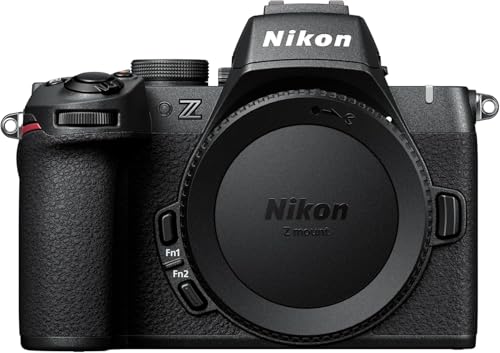
The Nikon Z50II is the company’s current entry point into serious mirrorless photography, and it is aimed squarely at people who want a capable camera without the size and cost of a full-frame body. Nikon announced it in November 2024 as a successor to the original Z50, and the big news is under the hood: the same EXPEED 7 processor that powers Nikon’s flagship Z9, plus a much brighter viewfinder and a set of creative color tools. This page goes through what Nikon says about the camera, who it fits and who should look elsewhere. For the whole field, see our ranking of the best mirrorless cameras of 2026.
We have not handled this camera and we take no measurements of our own. What follows compares the specifications on Nikon’s pages. Where Nikon does not list a number, we say so instead of guessing.
Sensor and Processor
Nikon lists a DX-format CMOS sensor measuring 23.5 by 15.7 mm with 20.9 million effective pixels. That is APS-C, which means a smaller sensor than a full-frame body, but also smaller, lighter lenses and a 1.5x crop factor that helps with distant subjects. Twenty-one megapixels is enough for large prints and for cropping, and it keeps files manageable.
The processor is EXPEED 7. Nikon says it is the same image-processing engine used in the Z9, and that it brings the same nine subject-detection types. A flagship-grade processor in a small camera is the main reason the Z50II is more than a refresh of the original.
Autofocus
Nikon says the Z50II detects nine types of subjects, the same as the Z9, and that it has an improved AF-A mode, which chooses between single and continuous focus automatically. In Auto mode, Nikon says deep-learning scene analysis also adjusts autofocus, flash and exposure. For a beginner, that means the camera makes many decisions in a fast-moving situation. A more experienced shooter can start with automatic settings and take over when ready.
Speed and Pre-Release Capture
Nikon’s spec page lists continuous high-speed shooting of roughly 11 fps in its extended mode, and about 15 fps in silent mode. For faster action, High-Speed Frame Capture+ shoots up to 30 fps. Nikon also lists Pre-Release Capture, which buffers up to one second of images before you fully press the shutter; Nikon says it works only in the High-Speed Frame Capture+ mode.
Pre-capture is helpful for moments that are hard to time: a bird taking off, a child blowing out candles, a dog catching a ball. Because it works only in a specific mode, check the manual for the trade-offs in file format and frame rate.
This is where the Z50II tries to set itself apart. Nikon added a dedicated Picture Control button, which is new to the Z series, and a Limit Picture Control list that shows only the styles you use most. Effects preview in live view and in the viewfinder, so you can see the look before you shoot.
Imaging Recipes take it a step further. According to Nikon, you can save your own settings as a recipe, or download free presets from Nikon or from creators through Nikon Imaging Cloud and save them as Cloud Picture Controls. If you like the idea of getting a finished look straight from the camera, without editing every photo, this is a genuinely useful feature. If you prefer to shoot RAW and edit in software, you may never touch it.
Video Features
Nikon lists 4K UHD up to 60p and 1080p up to 120p, H.265 10-bit and H.264 8-bit recording, MOV or MP4 files, and N-Log and HLG support. The overview describes 4K that is oversampled from 5.6K, which generally gives cleaner detail than recording 4K directly.
Other video features on Nikon’s pages include:
- A mode for showing products on camera, aimed at creators who hold items up to the lens.
- A video self-timer with 2-second or 10-second delays.
- USB streaming that works as a webcam and microphone input (UVC and UAC).
- Hi-Res Zoom at 1920 by 1080 at 30p, 25p or 24p.
- A maximum standard video ISO of 25600.
For stabilization, the product page mentions only an electronic vibration reduction mode, which Nikon says is stronger than the one on the Z50. Nikon’s spec page does not state in-body stabilization, so we do not claim it. If you shoot handheld video, plan on lenses with optical stabilization or use the electronic mode and accept a small crop.
Viewfinder and Screen
Nikon lists a 0.39-inch OLED viewfinder with about 2.36 million dots, 100 percent frame coverage and about 1.02x magnification. The page says its brightness is 1,000 cd/m2, about twice that of the original Z50, which helps in bright sun. The rear screen is a 3.2-inch vari-angle touchscreen with about 1.04 million dots, which swings out and rotates for vlogging and low-angle shots. The interface and viewfinder information also rotate for vertical shooting.
Size, Weight and Power
Nikon lists about 550 g (1 lb 3.4 oz) with battery and card and about 495 g (1 lb 1.5 oz) body only. It uses an EN-EL25a battery, and the older EN-EL25 also works with fewer shots per charge. There is a built-in flash, which is useful for fill light and for beginners who do not own a flash yet.
The camera takes SD, SDHC and SDXC cards, including UHS-II. There is a single card slot, so the camera cannot write a backup copy to a second card at the same time.
Who Should Buy the Z50II
The camera is a strong match if you:
- Want a first serious camera with autofocus that recognizes many kinds of subjects.
- Like getting a finished color look in camera and enjoy sharing recipes.
- Make videos for social media or YouTube and want a vari-angle screen and webcam support.
- Want something light enough to take anywhere.
- Plan to grow into the Nikon Z lens system, including full-frame lenses.
Who Should Look Elsewhere
If you need in-body stabilization for handheld video without a stabilized lens, the Sony a7C II lists 5-axis in-body stabilization, though it is a full-frame body that costs more.
If you shoot long video sessions and want a clear path to unlimited recording, the Lumix S5II lists it in specific modes, in a larger body.
If your priority is a camera designed first for vlogging, the Sony ZV-E10 II is designed around the creator workflow. The Z50II is the better pick when you want a viewfinder and a more traditional camera body.
If you shoot sports or wildlife and want the deepest buffers and fastest sensors, look at the stacked-sensor bodies near the top of our full ranking.
Ownership Costs to Plan For
The camera is sold as a body, so plan for a lens. Nikon makes compact DX lenses for the Z mount, and full-frame Z lenses also fit if you want room to grow. Budget for an extra battery, an SD card (a UHS-II card makes sense if you want the faster speeds), a bag and a screen protector. Because we do not list prices on this site, use the button below to see the current listing and the exact configuration on Amazon.
How It Compares With Its Neighbors
In our ranking, the Z50II is one of the entry-level APS-C choices, alongside the Sony ZV-E10 II and the Canon EOS R50. Its viewfinder, listed at 1,000 cd/m2, is a clear step up from the original Z50. Against the Sony ZV-E10 II, it has a viewfinder, which Sony’s release does not mention, while the Sony adds creator-oriented tools. Against the Canon EOS R50, it has a larger screen and the option to shoot faster in the High-Speed Frame Capture+ mode. Higher in the ranking, the Sony a6700 is the more advanced APS-C option, with in-body stabilization, but it costs more.
Bottom Line
The Nikon Z50II brings a flagship processor, a bright viewfinder and a clever set of color tools to a small, light APS-C body. It does not list in-body stabilization, and it has a single UHS-II card slot, so the trade-offs are clear. If you want a camera that is easy to use, fun to personalize and ready to grow with the Z lens system, it is a strong candidate.
See price on Amazon
Sources